Features

Everything your gym needs. One platform.

Manage equipment, track maintenance, coordinate repairs and make smarter decisions with RackTag.

RackTag gym equipment management dashboard with live equipment status

Gym equipment management, end to end

From the first member report to the final repair invoice, RackTag gives your team one place for gym asset management and maintenance tracking.

QR fault reporting

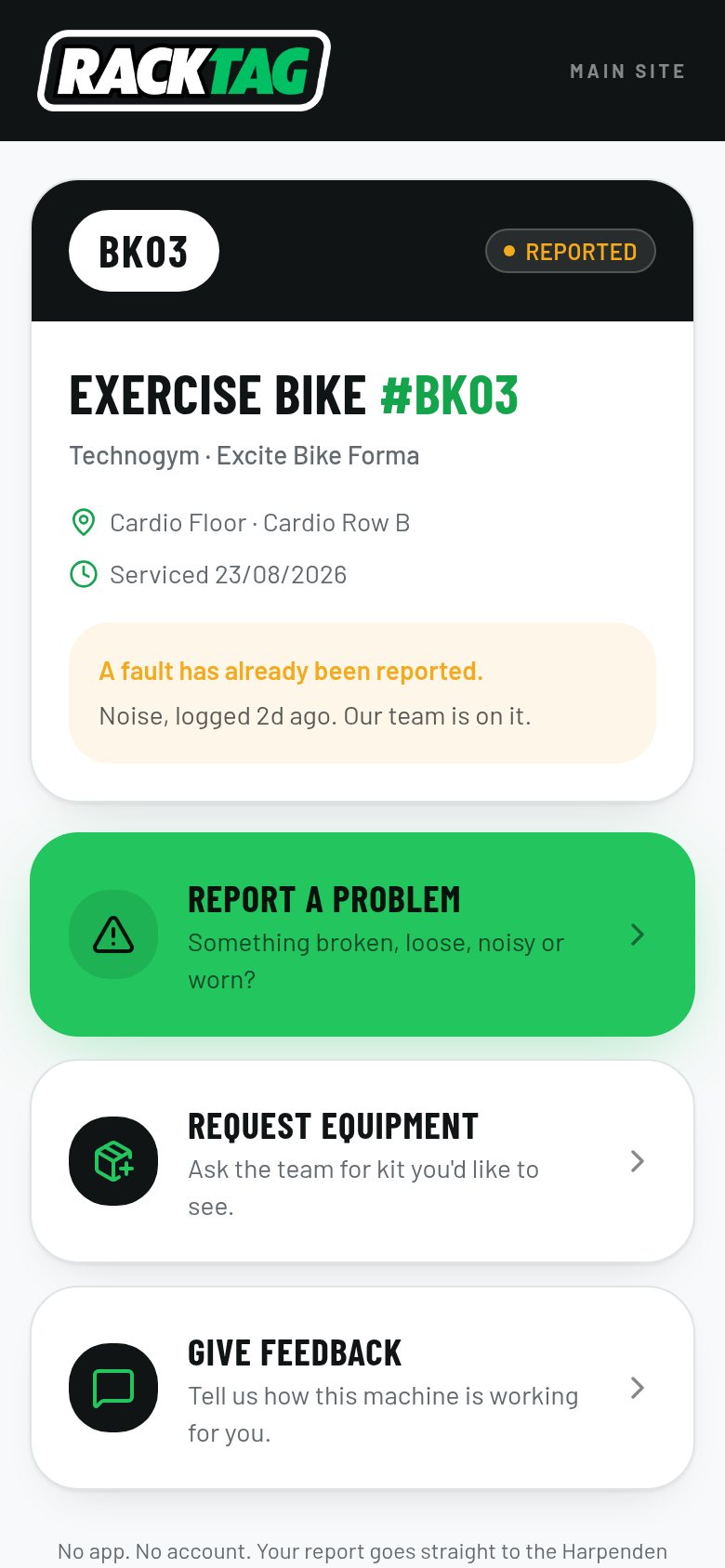
Every machine gets its own physical RackTag with a unique QR code. Members scan it with their phone camera to report a fault, request equipment or leave feedback, and the report lands straight with your team.

Key capabilities

  • Unique QR code per machine, printed on a physical RackTag
  • Report a problem with an issue type, notes and an optional photo
  • Shows members when a fault has already been reported
  • Request equipment and give feedback from the same tag

Why gym owners use it

  • Hear about faults the moment members notice them
  • Fewer duplicate complaints at reception
  • Clear, specific reports instead of vague verbal ones

Example workflow

  • 1Member scans the tag on a bike
  • 2Picks “Noise” and adds a short note
  • 3Your team sees it on the dashboard instantly
RackTag member page for an exercise bike showing Report a Problem, Request Equipment and Give Feedback

Equipment inventory & passports

Build your gym asset register by adding machines one by one or importing a CSV. Each machine gets an equipment passport with its identity, location, status, servicing, reports, documents and full history.

Key capabilities

  • Searchable asset register filtered by status and location
  • CSV equipment import
  • Equipment passport with overview, maintenance, performance, reports, documents and history
  • Equipment health score, availability and downtime
  • Print individual or all RackTags

Why gym owners use it

  • One reliable record of every machine you own
  • Instant answers on age, location and service status
  • Better evidence for warranty and replacement decisions

Example workflow

  • 1Import your equipment list from a spreadsheet
  • 2Print a RackTag for each machine
  • 3Open any machine’s passport to see its full story
RackTag equipment passport for an exercise bike showing health score, identity details and RackTag label

Fault & repair management

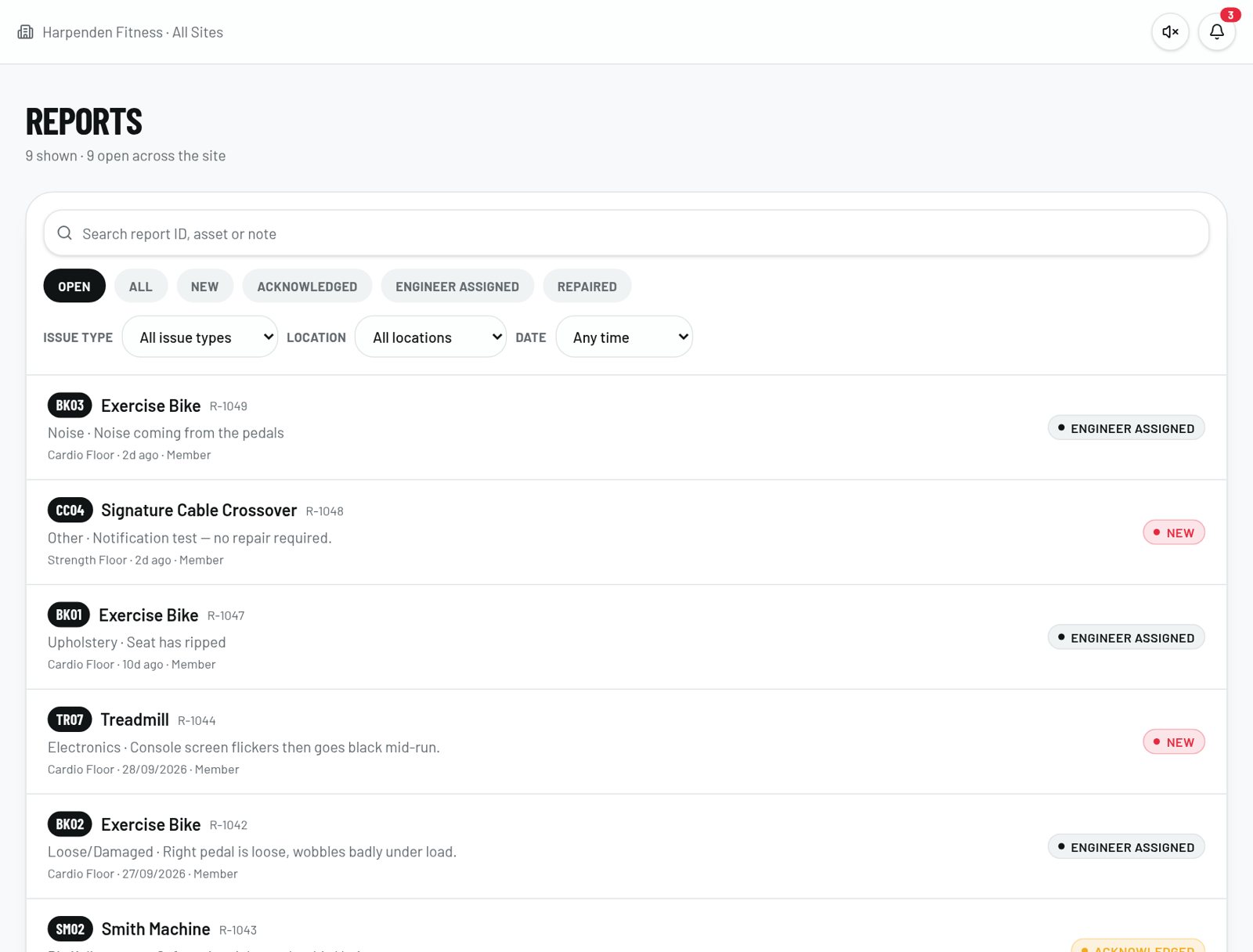
All reports arrive in one list with clear statuses — New, Acknowledged, Engineer Assigned and Repaired. Mark machines out of service so members know, then record the resolution and cost when the job is done.

Key capabilities

  • Report list with status, issue type, location and date filters
  • Acknowledge, assign an engineer and mark repaired
  • Mark equipment out of service and back in service
  • Record repair notes and repair costs
  • Members can confirm an existing fault instead of filing a new one

Why gym owners use it

  • Nothing falls through the cracks between shifts
  • Members see machines are being dealt with
  • Repair spend recorded against each machine

Example workflow

  • 1Staff acknowledge a new cable fault
  • 2Machine is marked out of service
  • 3Engineer fixes it and staff mark it repaired with the cost
RackTag reports list with status filters and fault reports for several machines

Gym equipment maintenance & servicing

Bring planned servicing and day-to-day repairs into one gym equipment maintenance record. RackTag helps UK gym owners and managers see which machines need attention, what work is scheduled and what has been completed — without losing the history between staff shifts.

A maintenance log for every machine

Keep service dates, providers, notes and recorded costs with the equipment passport. When a machine needs attention again, your team can look back at its repair and service history rather than search through separate messages or paperwork.

Planned servicing alongside fault reports

The servicing schedule shows last-service dates, next-due dates and overdue or due-soon status. Repair jobs sit alongside scheduled work, so a reported fault does not disappear behind the next routine service.

Coordinate engineers; keep your team in control

Assign a fault to an engineer in your contractor directory and choose to email the job details when an email address is available. Your staff record completion, notes and cost in RackTag; contractors do not need an account.

Key capabilities

  • Set a service interval for each machine and see its next due date
  • Review overdue and due-soon servicing alongside open repair jobs
  • Track open, scheduled and completed maintenance work
  • Record the service date, provider, optional notes and cost
  • Keep completed work linked to the equipment’s own history

Why gym owners use it

  • See outstanding repairs and planned servicing together
  • Give the next shift a clear record of work completed
  • Review recorded costs against the machine, not a separate paper log

Example workflow

  • 1Choose a service interval appropriate to the machine and its manufacturer’s guidance
  • 2Review next-due dates and overdue equipment in Maintenance
  • 3Coordinate repair work with an engineer from your contractor directory
  • 4After the work, staff record the service date, provider, notes and any cost; the next due date updates when a schedule is set

Maintenance management and scheduled servicing are included from the Pro plan. RackTag tracks the schedule your team sets; it does not inspect equipment, predict failures or replace professional servicing advice.
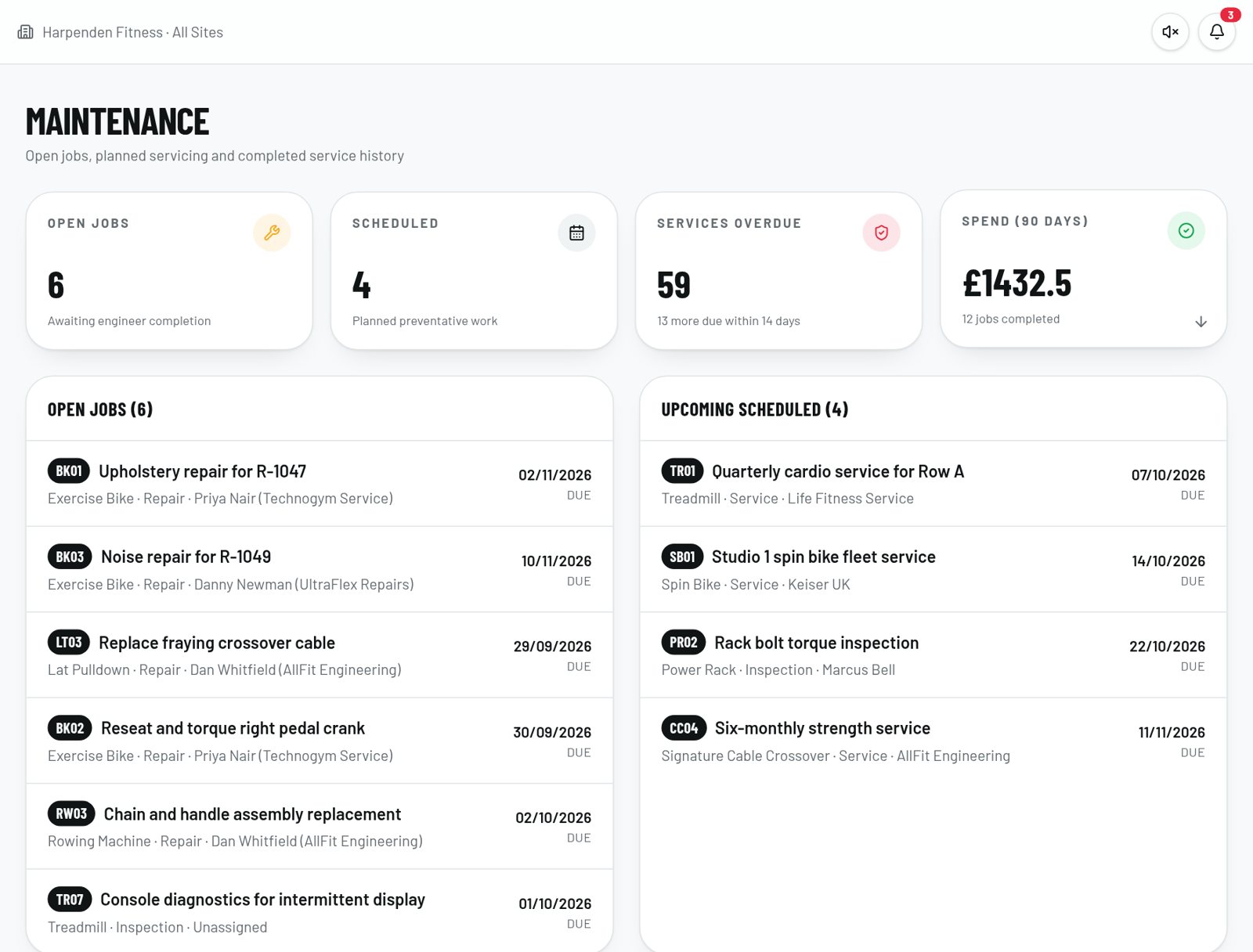
RackTag maintenance page showing open jobs, scheduled jobs, overdue services and 90-day spend

Maintenance jobs and servicing in the RackTag demo gym.
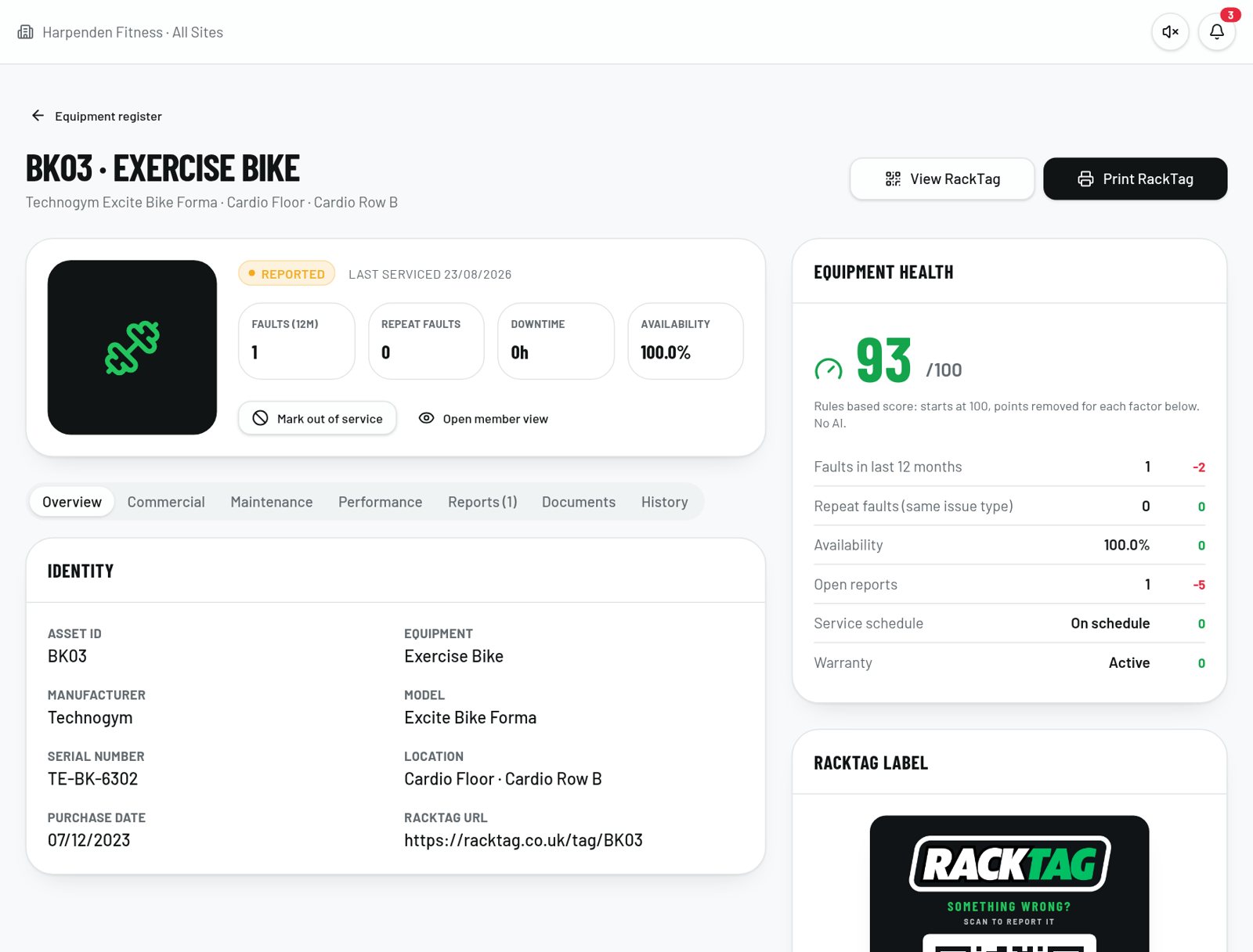
RackTag demo equipment passport showing the machine’s identity and health overview

Each machine has its own equipment passport, linking its details with its records.
Contractor management

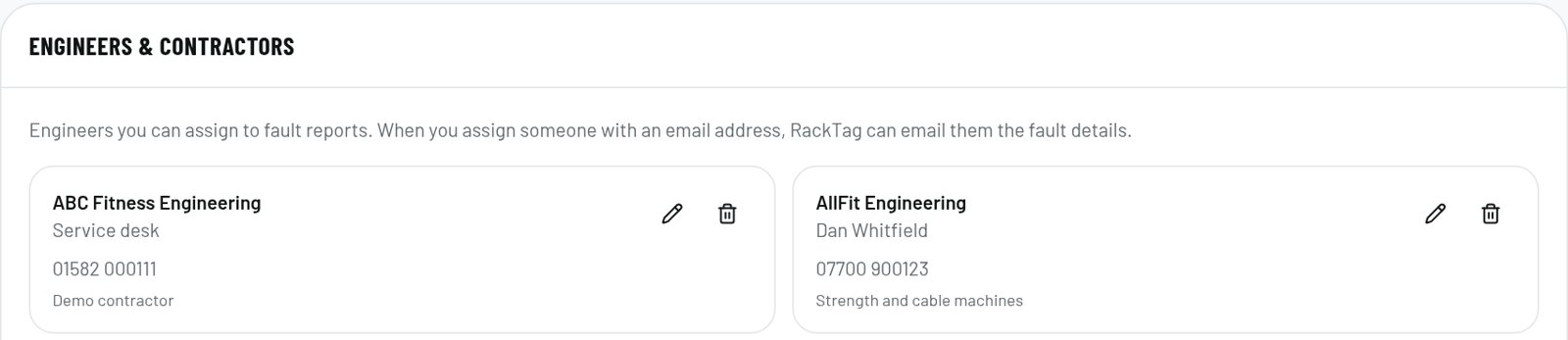
Keep your engineers and service companies in one place and coordinate every repair from the fault report. Your team stays in control: contractors receive job details by email and your staff record the outcome in RackTag.

RackTag Engineers and Contractors directory with contractor cards
RackTag maintenance jobs with assigned engineers
  1. 1

    Keep a contractor directory

    Add each engineer or company with a contact name, phone, email and notes such as “Cardio warranty work”.

  2. 2

    Assign a fault to an engineer

    From any fault report, choose who is dealing with it. The report moves to Engineer Assigned so your team knows it’s in hand.

  3. 3

    Email them the job details

    If the engineer has an email address, you can choose to email them the fault, the machine, its location and your gym contact.

  4. 4

    Track the job

    Repair jobs appear on the Maintenance page with the assigned engineer, so you can see what’s open and chase anything overdue.

  5. 5

    Record the work completed

    When the engineer has finished, your team marks the job complete with notes and cost, and it’s saved to the machine’s history.

Contractors don’t need a RackTag account. Job updates and completion are recorded by your team.

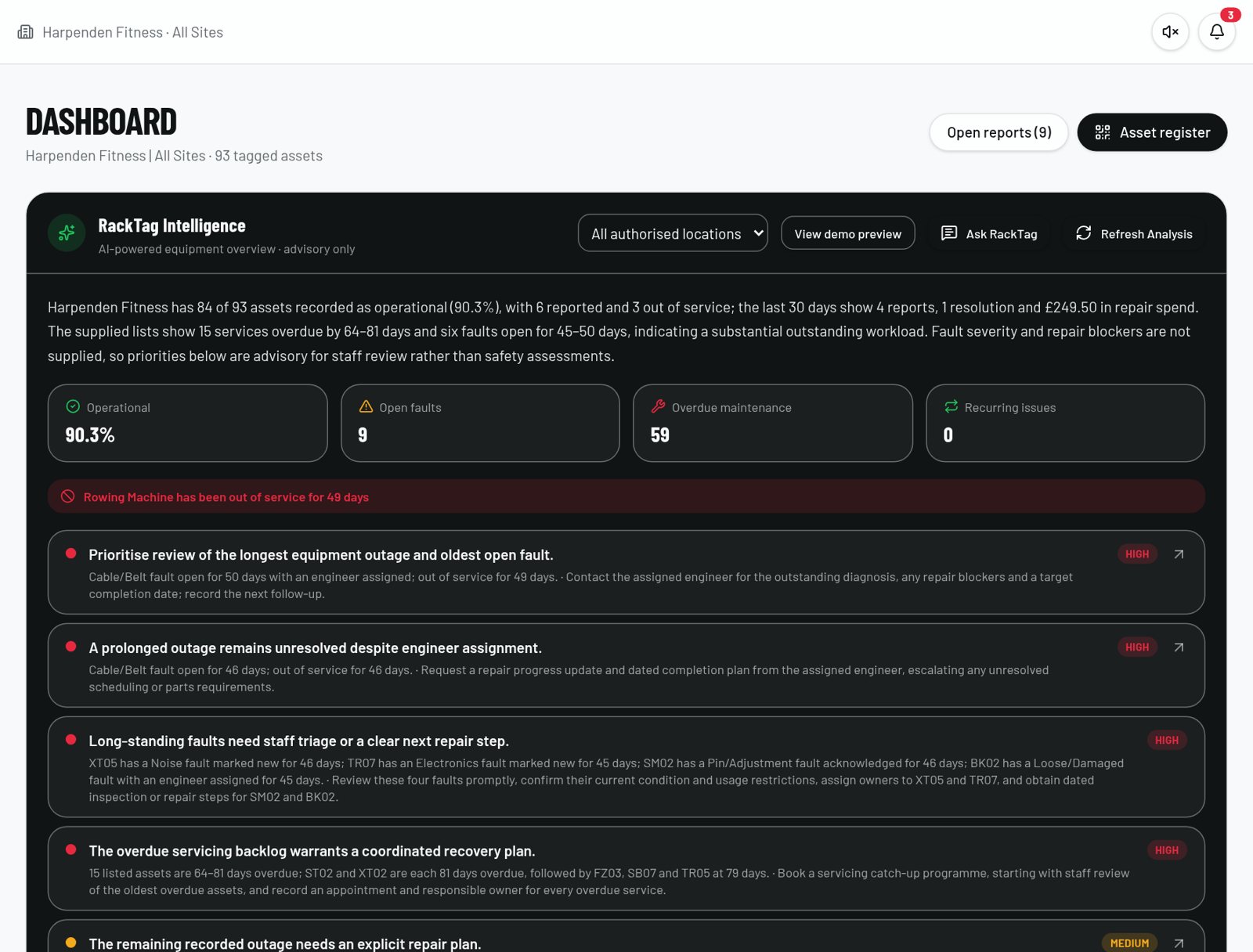
RackTag Intelligence

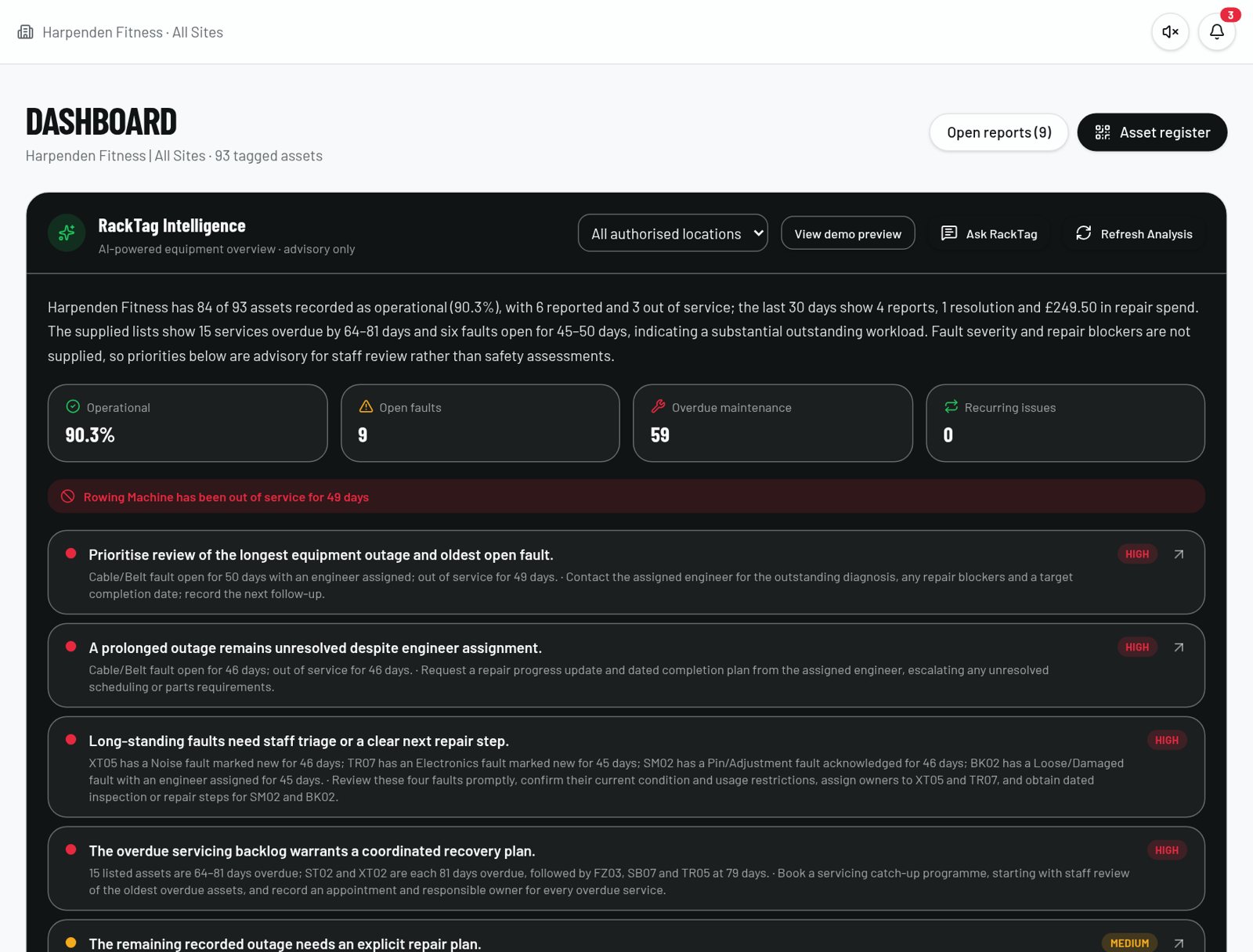
RackTag Intelligence reads the equipment information your gym has recorded — reports, repairs, servicing and downtime — and turns it into a clear summary with prioritised actions. Recommendations are based only on your recorded data and are advisory: your team decides what to do.

  • Equipment health overview

    Availability, open faults, overdue maintenance and recurring issues in one summary.

  • Fault trends

    Recent reports, resolutions and repair spend, with long-running outages called out.

  • Overdue servicing

    Which machines are overdue and by how long, so you can plan a catch-up.

  • Prioritised actions

    Recommended next steps ranked High, Medium or Low, each linked to the machine.

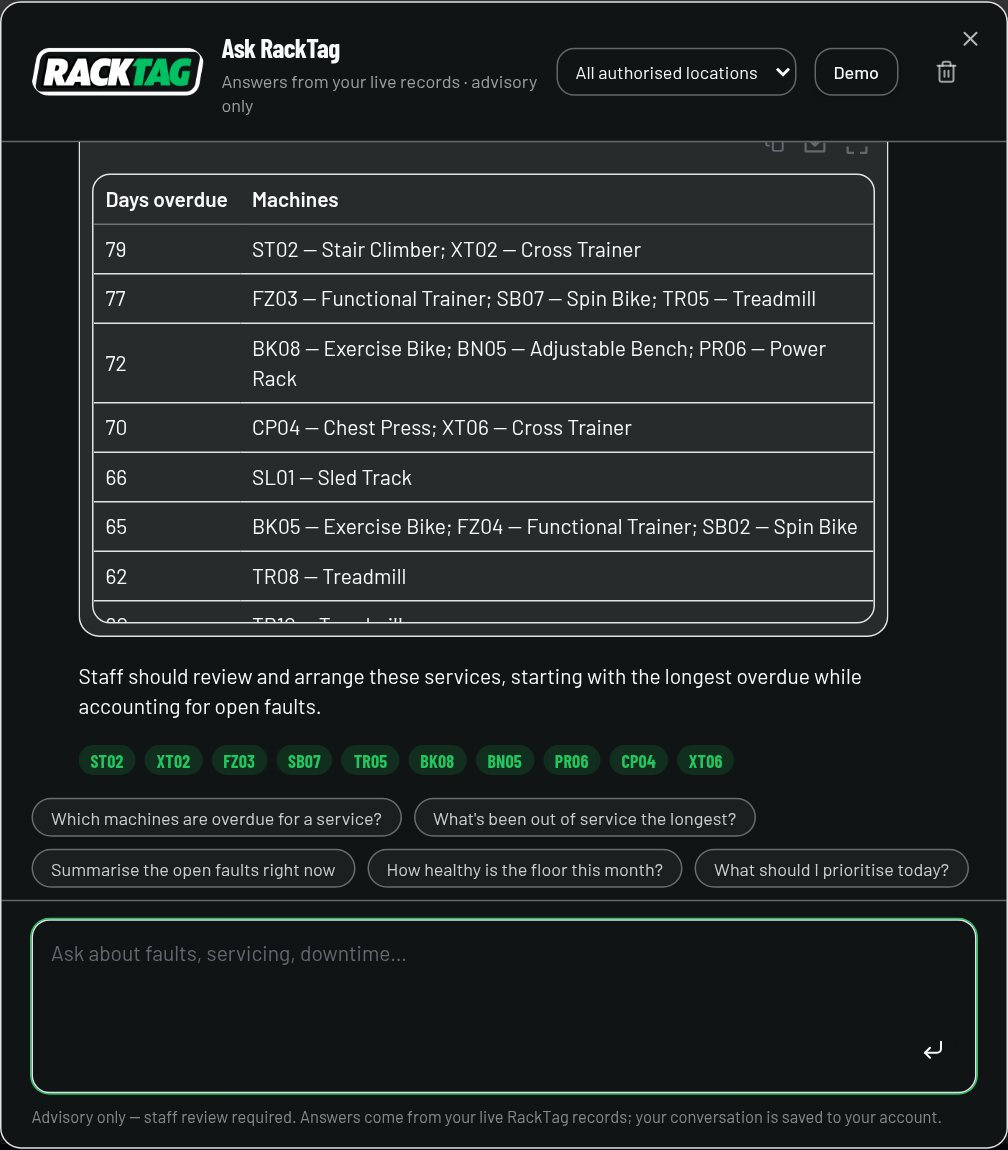
  • Ask RackTag

    Ask questions in plain English, like “What should I prioritise today?”

  • Equipment-specific insights

    Answers reference real machines, with one click through to their passport.

RackTag Intelligence panel with equipment health summary and prioritised recommended actions
Ask RackTag assistant answering which machines are overdue for a service

Screenshots show the RackTag demo gym.

Staff alerts & daily summaries

When a member reports a fault, staff signed in to RackTag see a pop-up alert with an optional alert tone. Staff can also receive email alerts, and owners and managers can opt in to a daily summary email.

Key capabilities

  • In-portal pop-up with optional alert tone for new faults
  • Email alerts for new fault reports (each person chooses)
  • Optional daily summary email for owners and managers
  • Notifications page with every alert in one place

Why gym owners use it

  • Faster response to broken equipment
  • Managers start the day knowing what needs attention
  • Each person controls what they receive

Example workflow

  • 1Member reports a fault on a cable crossover
  • 2Duty staff get a pop-up and an email
  • 3Manager sees it in tomorrow’s summary if still open
RackTag dashboard showing operational, reported and out of service counts with recent reports

Staff management & permissions

Invite staff with a secure link and give each person the right level of access. Owners and managers control settings, contractors and colours; staff handle the day-to-day reports and jobs.

Key capabilities

  • Owner, Manager and Staff roles
  • Restrict people to specific sites or give access to all
  • Invite people with a secure invite link
  • Each gym’s data is kept completely separate

Why gym owners use it

  • Everyone sees only what they need
  • Safe to give floor staff access
  • Easy onboarding for new team members

Example workflow

  • 1Owner invites a new duty manager
  • 2Limits them to the main site
  • 3They accept and start handling reports

Roles

  • OwnerFull control of the gym’s RackTag account.
  • ManagerManages settings, contractors and the team, and can opt in to daily summaries.
  • StaffHandles fault reports, repairs and servicing at the sites they’re assigned to.

Any role can be limited to specific sites.

Multi-site management

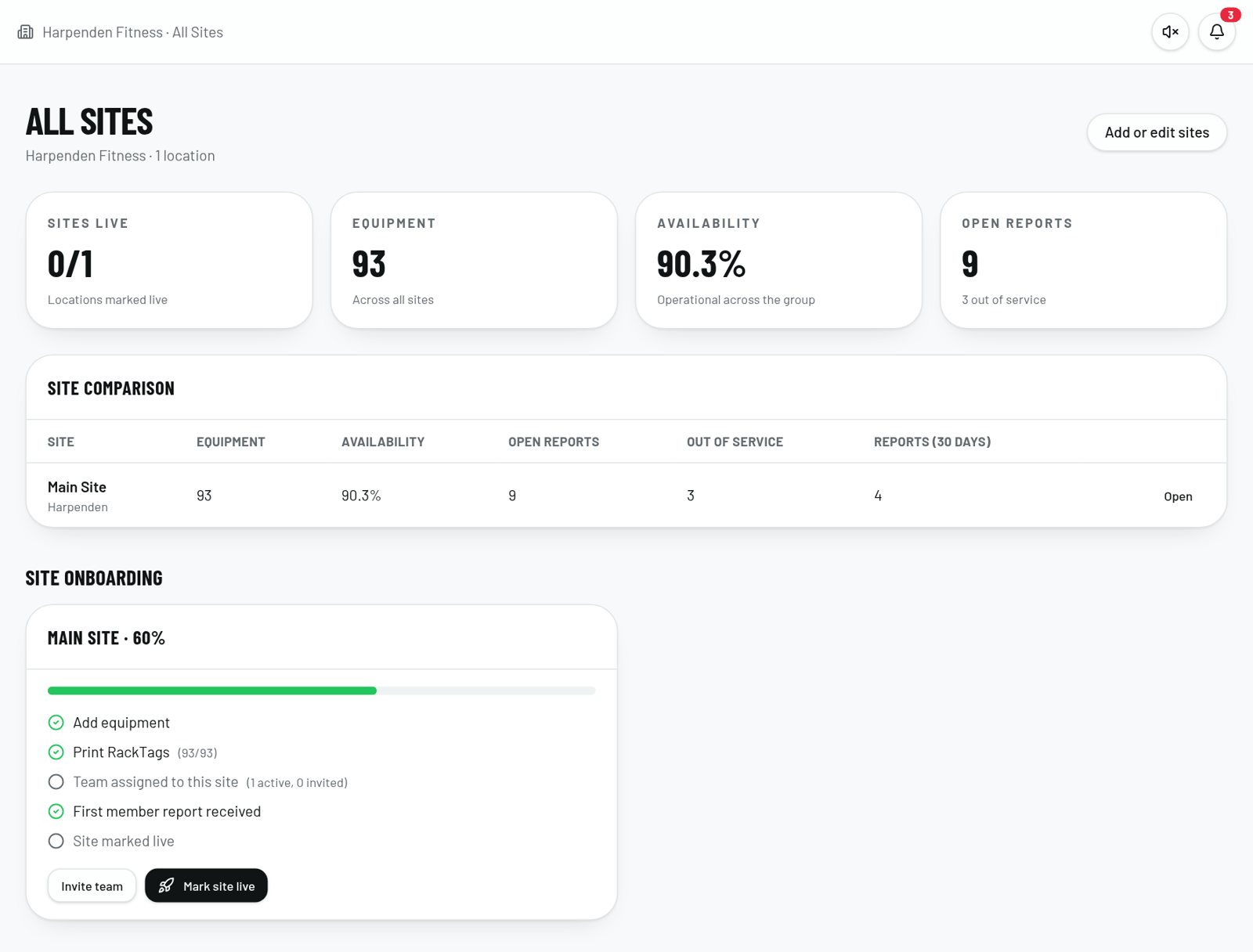
Running more than one gym? View all sites together or switch to one, compare equipment availability and open reports side by side, and track each site’s onboarding progress.

Key capabilities

  • Switch between all sites or a single site
  • Site comparison: equipment, availability, open reports, out of service
  • Site onboarding checklist
  • Staff limited to the sites they work at

Why gym owners use it

  • One view across your whole estate
  • See which site needs attention first
  • Consistent process at every location

Example workflow

  • 1Area manager opens All Sites
  • 2Spots one site with low availability
  • 3Drills into that site’s open reports

Multiple locations are included on the Multi Site plan.

RackTag All Sites page with site comparison table and site onboarding checklist

Member requests & feedback

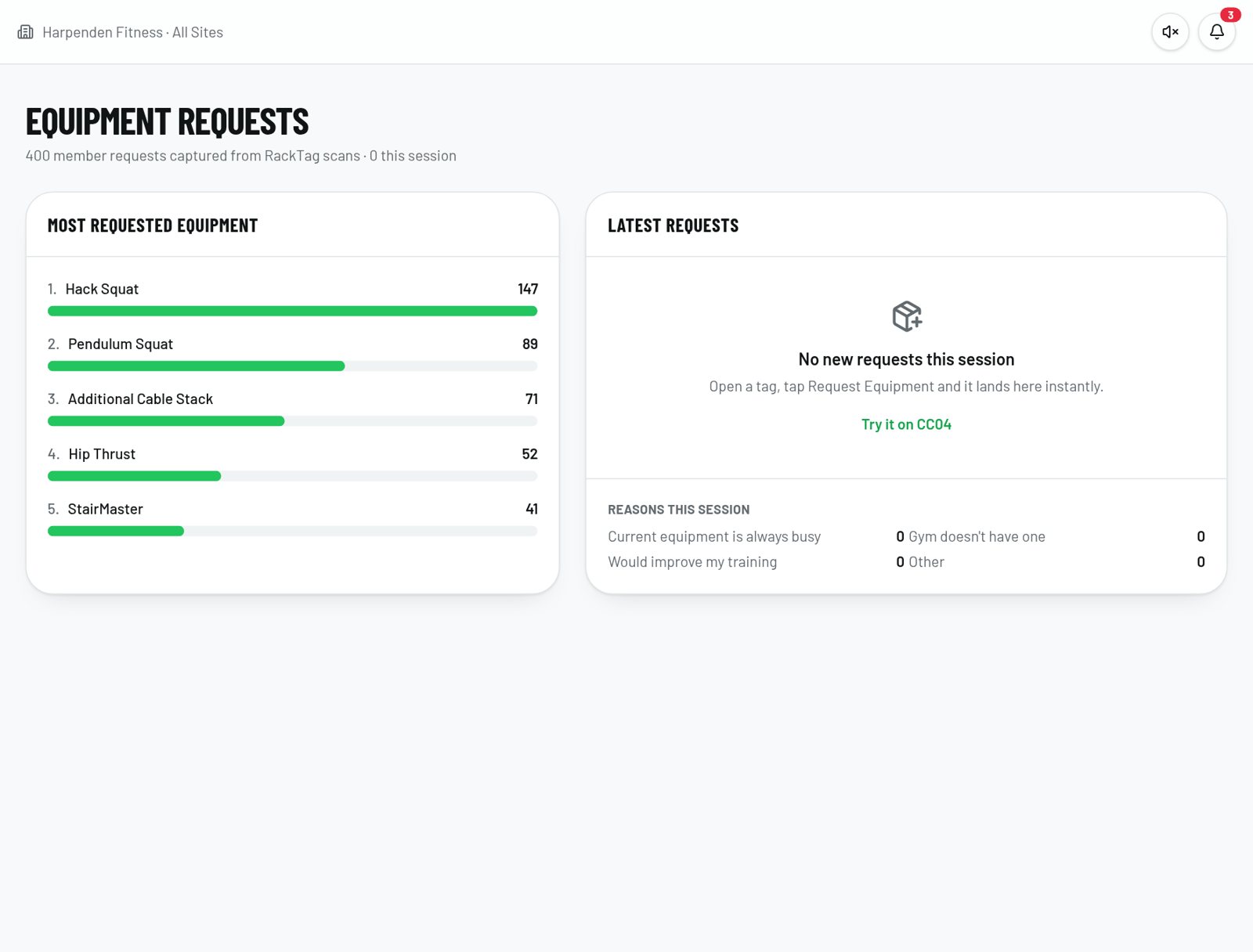
Members can request equipment and leave feedback from any RackTag. RackTag ranks the most requested equipment and shows why members are asking, helping you plan purchases with real data.

Key capabilities

  • Most requested equipment ranking
  • Reasons behind requests
  • Equipment feedback from members
  • Equipment health analytics on the dashboard

Why gym owners use it

  • Buy the equipment members actually want
  • Evidence for investment decisions
  • Members feel listened to

Example workflow

  • 1Members request a hack squat from nearby tags
  • 2It rises to the top of the list
  • 3You use it to justify the next purchase
RackTag equipment requests page ranking the most requested equipment

Branded RackTags

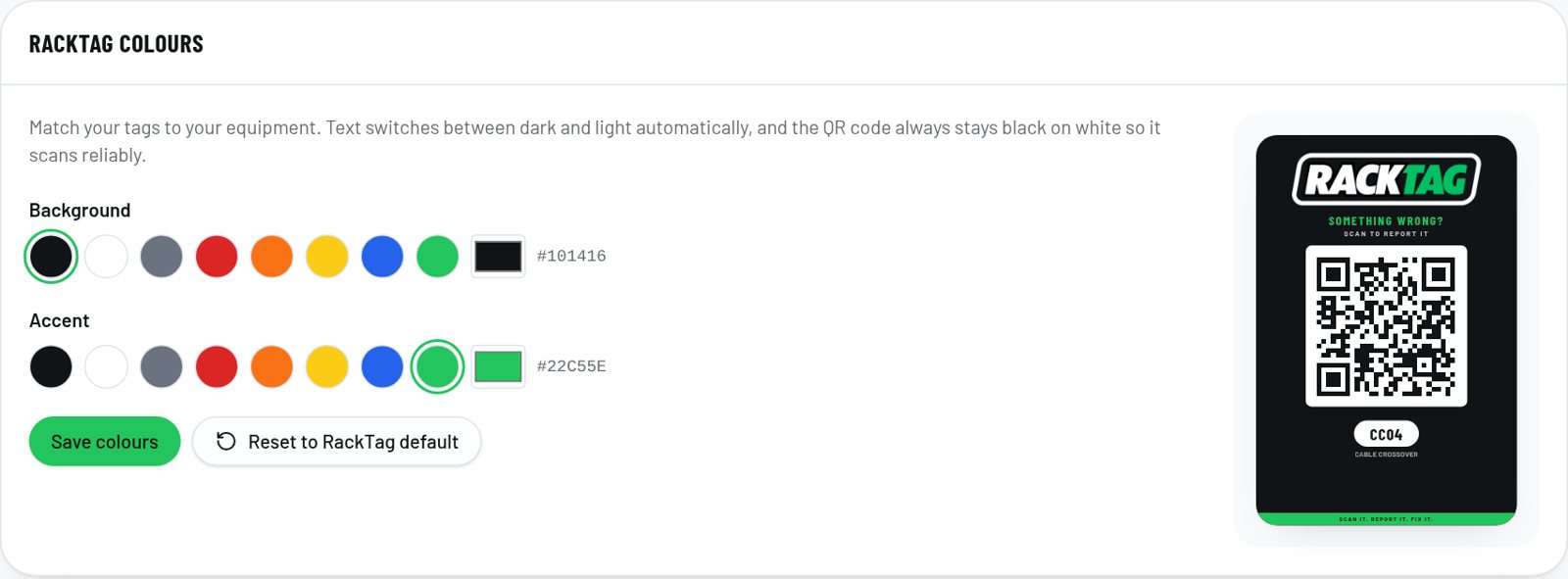
Choose a background and accent colour for your RackTags so they suit your equipment and brand. Text switches between light and dark automatically and the QR code always stays black on white so it scans reliably.

Key capabilities

  • Background and accent colour presets or custom colours
  • Live tag preview
  • Automatic readable text colour
  • QR always black on white for reliable scanning

Why gym owners use it

  • Tags that look like part of your gym
  • Consistent branding across the floor
  • No compromise on scanning

Example workflow

  • 1Pick your brand colours in Settings
  • 2Check the live preview
  • 3Print tags in your colours
RackTag colour settings with colour swatches and a live tag preview

Ready to take control of your gym equipment?

See how RackTag can simplify equipment management, reduce administrative work and give your team better visibility.